
Start with the variant list, not the photo gallery
Accurate jewelry variant photo matching begins with a complete list of what a customer can select. Build one row for every color, fastening, size, and set configuration before judging whether the gallery is complete. Then assign photographs to those rows based only on what each image actually shows. A beautiful photo is not useful evidence for a variant it does not represent.
The objective is narrower than taking better pictures. The phone jewelry photography shot list helps create usable images; this workflow decides which existing photograph belongs to which option and what to do when the evidence is missing.
Define the attributes a photograph must prove
List the attributes that could change the customer's selection. For jewelry, common fields include color direction, fastening category, measured size, pair or set composition, and visible motif. Materials, provenance, age, and performance should not be inferred from appearance. If those facts matter to the listing, they need documentation outside the image audit.
Give each attribute one of three evidence rules:
- Must be visible: a color option, visibly different motif, or different included-piece arrangement needs an image that shows the selected version.
- May share a visual: a size option that looks identical at the gallery scale may use the same visual evidence for comparison, while the exact measurement remains in text. Check each marketplace or feed's current URL rules separately.
- Needs another view: a fastening, clasp, side profile, or attachment cannot be verified from a front-only image. Require a back or side photograph rather than treating the front as proof.
When color is difficult to judge, use the separate online jewelry color check to compare image conditions and description language. That review still does not justify changing “green” to a specific gemstone name.
Create a photo-to-variant matrix
Use a matrix that can be audited without opening the storefront. One row represents one sellable option; one column represents one required image role.
The following is a hypothetical teaching matrix. It borrows three color names from the product example later in this article and adds a fictional clip-on option solely to demonstrate a missing-evidence decision. It is not a verified audit of that product, and it does not claim that the actual product offers a clip-on variant.
Use only four controlled statuses: matched when every required image and recorded fact agrees with the option; shared when one image truthfully represents more than one visually identical option; unresolved when evidence is incomplete; and conflict when the image contradicts the selected option.
| Variant | Front identity | Back or closure | Scale or dimensions | Pair/set contents | Status |
|---|---|---|---|---|---|
| Gold-tone and rose pink | Photo P1 | Back confirmed visibly identical; share Photo B2 | Text measurement pending | Pair statement visible or documented | Unresolved |
| Silver-tone and blue | Photo P2 | Dedicated back Photo B2 | Text measurement confirmed for this row | Pair statement visible or documented | Matched |
| Silver-tone and multicolor | Photo P3 | Back confirmed visibly identical; share Photo B2 | Text measurement confirmed for this row | Pair statement visible or documented | Shared |
| Clip-on option added later | Front image may be shared only if front is identical | Missing clip-on back | Confirm whether profile changes | Pair statement required | Unresolved |
“Probably correct” is not a status. If a row is unresolved or in conflict, record the missing or contradictory evidence beside it before deciding whether the option can remain customer-visible.
Check the selected image against the option name
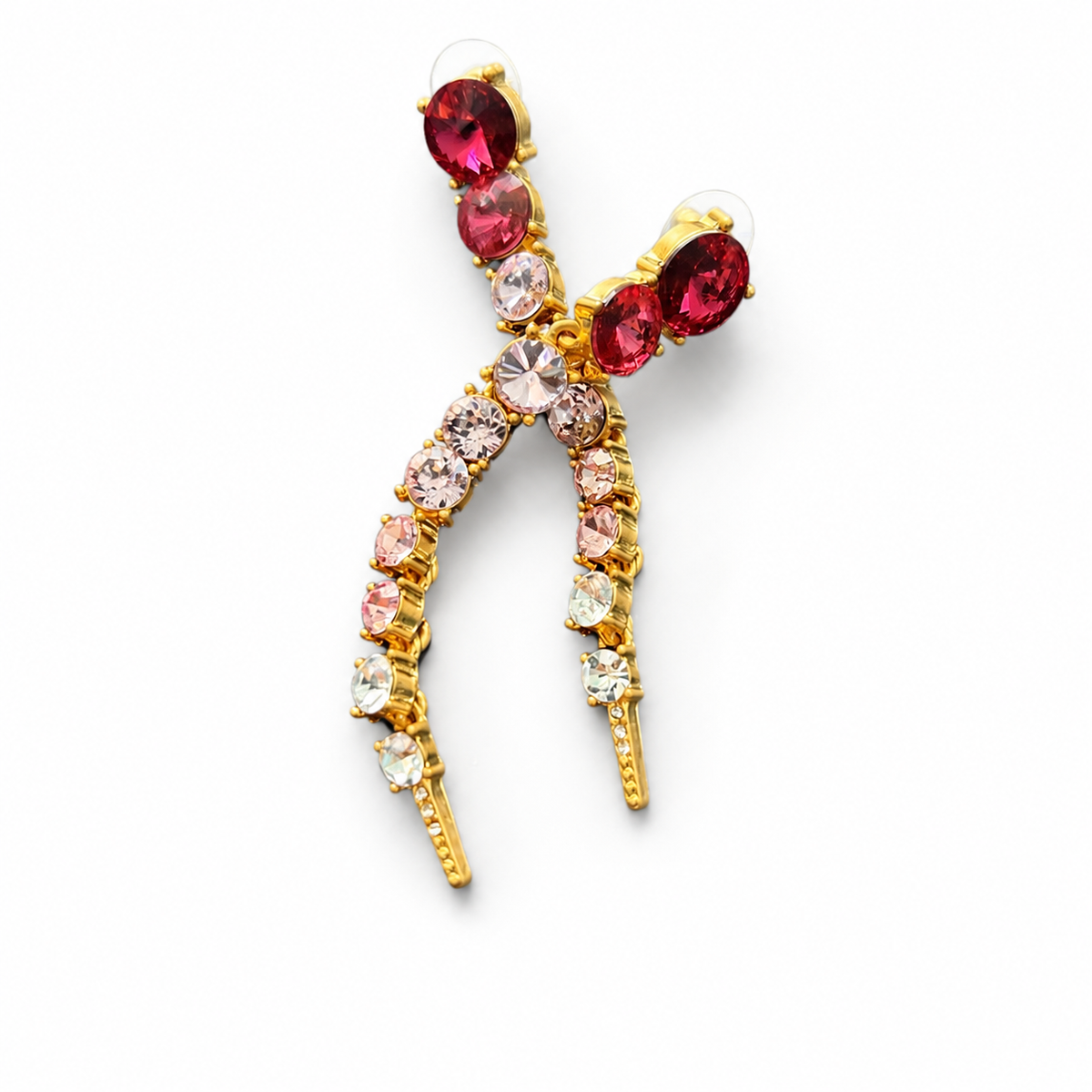
The current Rustic Jewel Co product record below has three named color combinations: Silver-Tone & Multicolor, Gold-Tone & Rose Pink, and Silver-Tone & Blue. Its gallery contains three corresponding visual color directions. The selected image here shows the gold-tone and rose-pink combination. That is a visible description, not a claim about the composition of its accents.

For each selectable option, perform a literal readback:
- Select the variant name in the product record.
- Open the assigned preview, not merely the first gallery image.
- Write the visible color, motif, and hardware view in plain language.
- Compare that description with the option value and product copy.
- Record matched, shared, unresolved, or conflict.
If a page offers “Blue” but the assigned preview is rose pink, that is a conflict even if a blue image exists elsewhere in the gallery. If the option is “Clip-On” and the image shows only the front, the closure remains unresolved unless another linked view supplies the evidence.
Make a deliberate missing-photo decision
Do not fill a gap with the nearest-looking image. Choose one of four actions:
- Assign: use an existing image that clearly matches the exact visible option.
- Share with disclosure: use one image for options that are visually identical in that view, while preserving exact size or other differences in text and checking channel rules.
- Create evidence: photograph the missing color, back, closure, profile, scale, or complete set. Use a stable filename tied to the variant.
- Hold the option: do not present a selectable variant with a misleading image when the missing view materially affects what the customer is choosing.
Google Merchant Center's current image guidance recommends a unique image that represents the distinguishing details of each visually different variant and says the image should match the offered color, pattern, and material when applicable. Shopify currently allows one assigned image per variant while keeping additional related images in the broader gallery. Etsy also lets sellers link a photo to a visible variation such as color. These platform mechanics differ, but the accuracy principle is consistent: the customer-selected option should not call up a contradictory photograph.
Audit the page as a customer would use it
Complete the matrix in the data record, then test the actual listing on desktop and mobile. Select every option and observe the resulting preview, option label, price, availability, and included-piece language. Check that a pair is not photographed or described as one loose earring unless the listing explains the composition. For a separate orientation and quantity review, use the matched earring pair checklist.
Also verify that the main image does not imply several colorways are included when the product sells one selected option. A group image can be useful as an additional overview, but the selected variant should lead to an image that represents what that selection means. If a set is sold together, show every included component or state the contents clearly.
Browse the current statement earring collection to compare how product names, options, and visible photos work together. Treat the audit result as listing evidence only. It does not establish material identity, inventory accuracy, indexing, ranking, or sales impact.